
Bifrost Gateway의 Auth 설정은 Dashboard, Admin API, Inference API 접근을 보호하기 위한 기본 인증 기능입니다.
운영 환경에서는 Dashboard와 Admin API가 외부에 노출될 수 있으므로, 반드시 인증 설정을 켜는 것이 좋습니다.
Auth가 보호하는 범위 #
| 구분 | 인증 적용 방식 |
|---|---|
| Dashboard | 로그인 세션 기반 Bearer Token 사용 |
| Admin API | 인증 활성화 시 Basic Auth 또는 Bearer Token 필요 |
| Inference API | 기본적으로 인증 필요. 단, 별도 토글로 인증 제외 가능 |
| Whitelisted Routes | 지정한 Dashboard/Admin API 경로는 인증 우회 가능 |
| MCP Tool Execution | Inference 인증 제외 토글을 켜도 인증 필요 |
설정 절차 #
Bifrost Dashboard에서 다음 경로(Settings → Security)로 이동합니다.
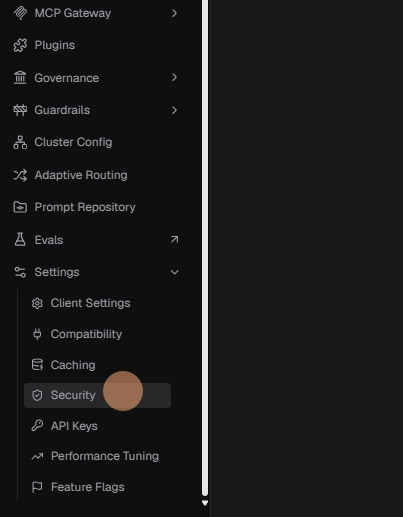
Security 탭 안의 Password protect the dashboard 섹션에서 Dashboard 인증을 설정합니다.
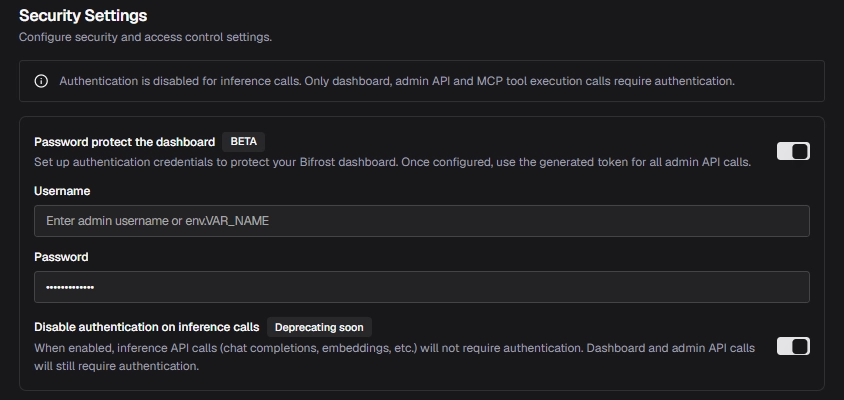
Password protect the dashboard 섹션을 찾습니다
Password protect the dashboard 토글을 켭니다
admin username , admin password 을 생성합니다.
Inference Call 인증 여부 선택 (deprecated 예정) #
기본 동작은 인증이 활성화되면 Inference API 호출도 인증을 요구하는 것입니다.
필요하다면 Disable authentication on inference calls 토글을 켜서 Inference API 인증만 제외할 수 있습니다.
| 옵션 상태 | 결과 |
|---|---|
| OFF | Dashboard, Admin API, Inference API 모두 인증 필요 |
| ON | Dashboard와 Admin API는 인증 필요, Inference API는 인증 불필요 |
주의할 점은 이 토글을 켜도 MCP tool execution calls는 계속 인증이 필요하다는 점 입니다.
Whitelisted Routes 설정 #
특정 Dashboard/Admin API 경로만 인증을 우회시키고 싶다면 Whitelisted Routes에 경로를 입력합니다.
쉼표로 구분해서 여러 경로를 입력할 수 있습니다.
/api/custom-webhook, /api/public-endpoint, /api/webhook**는 prefix match로 동작합니다.
예를 들어 아래 경로는:
/api/webhook*다음 요청들을 모두 매칭합니다
/api/webhook
/api/webhook/v1
/api/webhook/github다음 시스템 경로는 설정과 관계없이 항상 whitelist 처리됩니다
/health
/api/session/login
/api/session/is-auth-enabled
/api/oauth/callback
/api/infoWhitelisted Routes는 Dashboard/Admin API 엔드포인트에만 적용됩니다.
Inference API는 Disable authentication on inference calls 토글로 별도 제어합니다.
Save Changes를 클릭하면 설정이 즉시 적용됩니다.
Inference API 호출 예시 #
Inference API에서도 인증을 받도록 설정을 하면 Basic Auth를 사용해 /v1/chat/completions를 아래와 같이 호출 할 수 있습니다.
curl -X POST <http://localhost:8080/v1/chat/completions> \\
  -u "your-username:your-password" \\
  -H "Content-Type: application/json" \\
  -d '{
    "model": "openai/gpt-4o",
    "messages": [
      {
        "role": "user",
        "content": "Hello!"
      }
    ]
  }'
https://docs.getbifrost.ai/quickstart/gateway/setting-up-auth


